It's now late into 2025, and just over a year since I wrote my last post on Passkeys. The prevailing dialogue that I see from thought leaders is "addressing common misconceptions" around Passkeys, the implication being that "you just don't understand it correctly" if you have doubts. Clearly I don't understand Passkeys in that case.
And yet, I am here to once again say - yep, it's 2025 and Passkeys still have all the issues I've mentioned before, and a few new ones I've learnt! Let's round up the year together then.
Too Lazy - Didn't Read
- Passkeys have flaws - learn about them and use them on your terms. Don't write them off wholesale based on this blog. I, the author of this blog, use Passkeys!!!
- DO engage with and learn about Credential Managers (aka Password Managers). This is where the Passkey is stored.
- DO use a Credential Manager you control and can backup. I recommend Bitwarden or Vaultwarden which allow backups to be taken easily.
- AVOID using a platform (Apple, Google, Microsoft) Credential Manager as your only Passkey repository - these can't easily backed up and you CAN be locked out permanently.
- IF you use a platform Passkey manager, frequently sync it with FIDO Credential Exchange to an external Credential Manager you can backup/control.
- OR use both the platform Passkey manager AND a Credential Manager you control in parallel.
- For high value accounts such as email which are on the account recovery path
- DO use Yubikeys for your email account as the Passkey store.
- DO keep strong machine generated passwords + TOTP in your Credential Managers as alternatives to Passkeys for your email accounts.
- DO a thought experiment - if I lost access to my Credential Manager what is the recovery path? Ensure you can rebuild from disaster.
So what has changed?
The major change in the last 12 months has been the introduction of the FIDO Credential Exchange Specification.
Most people within the tech community who have dismissed my claim that "Passkeys are a form of vendor lockin" are now pointing at this specification as proof that this claim is now wrong.
"See! Look! You can export your credentials to another Passkey provider if you want! We aren't locking you in!!!"
I have to agree - this is great if you want to change which garden you live inside. However it doesn't help with the continual friction that exists using Passkeys, or the challenges of day to day usage of Passkeys when you have devices from different ecosystems.
So it's very realistic that a user may end up with fragmented Passkeys between their devices, and they may end up not aware they can make this jump between providers, or that they could consolidate their credentials to a single Credential Manager. This ends up in the same position where even though the user could change provider, they may end up feeling locked into one provider because they aren't given the information they need to make an informed decision about how they could use other Credential Managers.
For example, I think it would be very realistic to assume that some users may feel that their Passkeys are bound to only their phone. Or that since their phone was the first device to have Passkeys, that's "just where the Passkeys live".
Let's address one of the biases here - I've been heavily affected by the Apple side of this problem where any Passkeys from Apple's devices can't sync to a non-Apple device. Other vendors often can allow you to sync out of their ecosystem - Microsoft Password Manager and Google Password Manager for example may allow you to sync to other devices (from information I was told on 2025-12-18, that I have partially confirmed, I could still be wrong - and often am.).
This means that for Apple users, you may feel a bit more "trapped" if you use their platform Passkeys compared to other vendors.
What's the same?
Passkeys Are Still Hard to Conceptualise
Passwords for all their security flaws are easy for a person to grasp. "Something only I know!".
SMS 2FA is easy to use - wait for the message and type in the code. "Something only I can receive".
Yes I know SMS isn't secure, don't come at me.
Beyond that we start to face challenges.
Storing a password into a Credential Manager is an act of trust. Knowing that you dont know the password any more. Knowing you only have to know the password to access the Credential Manager. Being able to conceptualise that storage process and trust it. I can at least see the random password in the Credential Manager so it brings a feeling of safety. I can print that out and it would be annoying but I guess I could type it back in. But it's something I can still conceptualise.
From there TOTP in a Credential Manager is not a difficult jump to make. You can see that random seed, the number changing every 30 seconds, and I already trust the Credential Manager to save my passwords. It's not hard to start to trust TOTP too at this point.
So what about a Passkey?
Passkeys don't have anything tangible I can observe - how are they working? Compared to the Password I can't "see" what makes it secure. I only have the words on the screen to go by. I can't even print it out and keep a copy in case of a disaster.
But moreover, what if I'd never gotten past SMS 2FA - what if I had never used a Credential Manager and learnt to understand and trust how they work? Now suddenly I am on a bigger journey. I now have to shift from "something I know" to "something I trust", without the intermediate steps in the process.
And asking users to trust something that they can't see inside of is a big request. Even today I still get questions from smart security invested technical persons about how Passkeys work. If this confuses security engineers, what about people in other areas with different areas of expertise?
Thought Leadership
Today I saw this excellent quote in the context of why Passkeys are better than Password and TOTP in a Password Manager:
Individuals having to learn to use password management software and be vigilant against phishing is an industry failure, not a personal success.
Even giving as much benefit of the doubt to this statement, and that the "and" might be load bearing we have to ask - Where are passkeys stored?
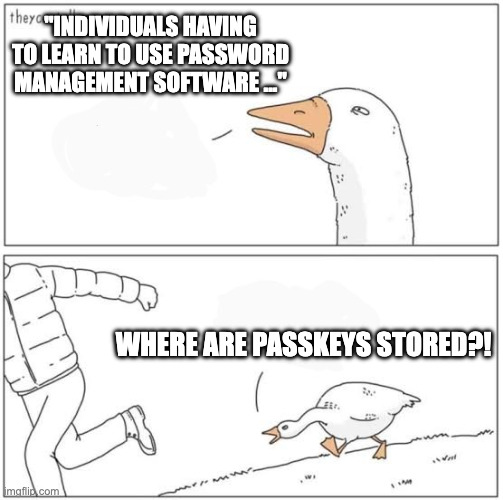
So we still have to teach individuals about password (credential) managers, and how Passkeys work so that people trust them. That fundamental truth hasn't changed. But this also adds a natural barrier to Passkey adoption - the same barriers which have affected Credential Manager adoption for the last decade or so.
Not only this - if a person is choosing a password and TOTP over a Passkey (or even recommending them), we have to ask "why is that"? Do we think that it's truly about arrogance? Do we think that this user believes they are more important? Or is there an underlying usability issue at play?
Do we really think that Passkeys come without needing user education? To me it feels like this comment is overlooking the barriers that Passkeys naturally come with.
Maybe I'm fundamentally missing the original point of this comment. Maybe I am completely misinterpretting it. But I still think we need to say if a person chooses password and TOTP over a Passkey even once they are informed of the choices, then Passkeys have failed that user. What could we have done better?
Perhaps one could interpret this statement as you don't need to teach users about Passkeys if they are using their ✨ m a g i c a l ✨ platform Passkey manager since it's so much nicer than a password and TOTP and it just works. And that leads to ...
It's Still Vendor Lockin
In economics, vendor lock-in, [...] makes a customer dependent on a vendor for products, unable to use another vendor without substantial switching costs.
See, the big issue that the thought leaders seem to get wrong is that they believe that if you can use FIDO Credential Exchange, then you aren't locked in because you can move between Passkey providers.
The issue is when you try to go against the platform manager, it's the continual friction at each stage of the users experience. It makes the cost to switch high because at each point you encounter friction if you deviate from the vendors intended paths.
For example, consider the Apple Passkey modal:
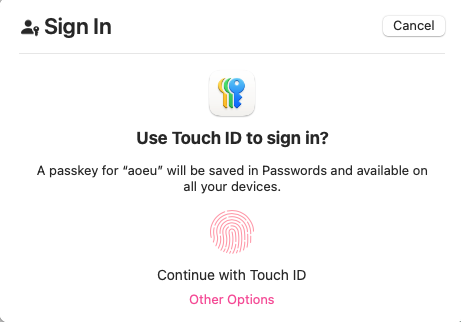
MacOS 15.7.1 taken on 2025-10-29
The majority of this modal is dedicated to "you should make a Passkey in your Apple Keychain". If you
want to use your Android phone or a Security Key, where would I click? Oh yes, Other Options.
Per Apple's Human Interface Guidelines:
Make buttons easy for people to use. It’s essential to include enough space around a button so that people can visually distinguish it from surrounding components and content. Giving a button enough space is also critical for helping people select or activate it, regardless of the method of input they use.
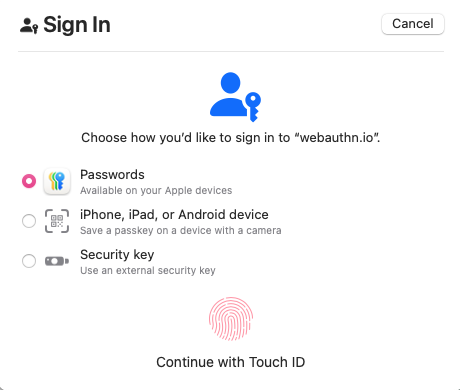
MacOS 15.7.1 taken on 2025-10-29
When you select Other Options this is what you see - see how Touch ID is still the default, despite
the fact that I already indicated I don't want to use it by selecting Other Options? At this point
I would need to select Security Key and then click again to use my key. Similar for Android Phone.
And guess what - my preferences and choices are never remembered. I guess it's true what they say.
Software engineers don't understand consent, and it shows.
Google Chrome has a similar set of Modals and nudges (though props to Chrome, they at least implicitly activate your security key from the first modal so a power user who knows the trick can use it). So they are just as bad here IMO.
This is what I mean by "vendor lockin". It's not just about where the private keys are stored. It's the continual friction at each step of the interaction when you deviate from the vendors intended path. It's about making it so annoying to use anything else that you settle into one vendors ecosystem. It's about the lack of communication about where Passkeys are stored that tricks users into settling into their vendor ecosystem. That's vendor lock-in.
Cloud Keychains Are Still Blowing Up Data
We still get reports of people losing Passkeys from Apple Keychain. We similarly get reports of Android phones that one day just stop creating new Passkeys, or stop being able to use existing ones. One exceptional story we saw recently was of an Android device that stopped using it's onboard Passkeys and also stopped accepting NFC key. USB CTAP would still function, and all the historical fixes we've seen (such as full device resets) would not work. So now what? I'm not sure of the outcome of this story, but my assumption is there was not a happy ending.
If someone ends up locked out of their accounts because their Passkeys got nuked silently, what are we meant to do to help them? How will they ever trust Passkeys again?
Vendors Can Lock You Out
Dr Paris Buttfield-Addison was locked out of their Apple account.
I recommend you read the post, but the side effect - every Passkey they had in an Apple keychain is now unrecoverable.
There is just as much evidence about the same account practices with Google and Microsoft.
I honestly don't think I have to say much else, this is terrifying that every account you own could be destroyed by a single action where you have no recourse.
Authentication Providers Still Miscommunicate
We still have issues where services that are embracing Passkeys are communicating badly about them. The gold standard of miscommunication came to me a few months ago infact (2025-10-29) when a company emailed me this statement:
Passkeys use your unique features – known as biometrics – like your facial features, your fingerprint or a PIN to let us know that it’s really you. They provide increased security because unlike a password or username, they can’t be shared with anyone, making them phishing resistant.
As someone who is deeply aware of how webauthn works I know that my facial features or fingerprint never really leave my device. However asking my partner (context: my partner is a veternary surgeon, and so I feel justified in claiming that she is a very intelligent and educated woman) to read this, her interpretation was:
So this means a Passkey sends my face or fingerprint over the internet for the service to verify? Is that also why they believe it is phishing resistant because you can't clone my face or my fingerprint?
This is a smart, educated person, with the title of doctor, and even she is concluding that Passkeys are sending biometrics over the internet. What are people in other disciplines going to think? What about people with a cognitive impairment or who do not have access to education about Passkeys?
This kind of messaging that leads people to believe we are sending personal physical features over the internet is harmful because most people will not want to send these data to a remote service. This completely undermines the trust in Passkeys because we are establishing to people that they are personally invasive in a way that username and passwords are not!
And guess what - platform Passkey provider modals/dialogs don't do anything to counter this information and often leave users with the same feeling.
Authentication Providers Are Still Playing Silly Games With User Choice
A past complaint was that I had encountered services that only accepted a single Passkey as they assumed you would use a synchronised cloud keychain of some kind. In 2025 I still see a handful of these services, but mostly the large problem sites have now finally allowed you to enrol multiple Passkeys.
But that doesn't stop sites pulling tricks on you.
I've encountered multiple sites that now use authenticatorAttachment options to force you to use
a platform bound Passkey. In other words, they force you into Microsoft, Google or Apple. No password manager,
no security key, no choices.
I won't claim this one as an attempt at "vendor lockin" by the big players, but it is a reflection of what developers believe a Passkey to be - they believe it means a private key stored in one of those vendors devices, and nothing else. So much of this comes from the confused historical origins of Passkeys and we aren't doing anything to change it.
When I have confronted these sites about the mispractice, they pretty much shrugged and said "well no one else has complained so meh". Guess I won't be enrolling a Passkey with you then.
One other site that pulled this said "instead of selecting continue, select this other option and you
get the authenticatorAttachment=cross-platform setting. Except that they could literally do
nothing with authenticatorAttachment and leave it up to the platform modals allowing me the choice
(and fewer friction burns) of choosing where I want to enrol my Passkey.
Another very naughty website attempts to enroll a Passkey on your device with no prior warning or consent when you login, which is very surprising to anyone and seems very deceptive as a practice. Ironically same vendor doesn't use your passkey when you go to sign in again anyway.
Conclusion
Yep, Passkeys Still Have Problems.
But it's not all doom and gloom.
Most of the issues are around platform Passkey providers like Apple, Microsoft or Google, where the power balance is shifted against you as a user.
The best thing you can do as a user, and for anyone in your life you want to help, is to be educated about Credential Managers. Regardless of Passwords, TOTP, Passkeys or anything else, empowering people to manage and think about their online security via a Credential Manager they feel they control and understand is critical - not an "industry failure".
Using a Credential Manager that you have control over shields you from the account lockout and platform blow-up risks that exist with platform Passkeys. Additionally most Credential Managers will allow you to backup your credentials too. It can be a great idea to do this every few months and put the content onto a USB drive in a safe location.
If you do choose to use a platform Passkey provider, you can "emulate" this backup ability by using the credential export function to another Passkey provider, and then do the backups from there.
You can also use a Yubikey as a Credential Manager if you want - modern keys (firmware version 5.7 and greater) can store up to 150 Passkeys on them, so you could consider skipping software Credential Managers entirely for some accounts.
The most critical accounts you own though need some special care. Email is one of those - email generally is the path by which all other credential resets and account recovery flows occur. This means losing your email access is the most devastating loss as anything else could potentially be recovered.
For email, this is why I recommend using hardware security keys (yubikeys are the gold standard here) if you want Passkeys to protect your email. Always keep a strong password and TOTP as an extra recovery path, but don't use it day to day since it can be phished. Ensure these details are physically secure and backed up - again a USB drive or even a print out on paper in a safe and secure location so that you can "bootstrap your accounts" in the case of a major failure.
If you are an Apple or Google employee - change your dialogs to allow remembering choices the user has previously made on sites, or wholesale allow skipping some parts - for example I want to skip straight to Security Key, and maybe I'll choose to go back for something else. But let me make that choice. Similar, make the choice to use different Passkey providers a first-class citizen in the UI, not just a tiny text afterthought.
If you are a developer deploying Passkeys, then don't use any of the pre-filtering Webauthn options or javascript API's. Just leave it to the users platform modals to let the person choose. If you want people to enroll a passkey on sign in, communicate that before you attempt the enrolment. Remember kids, consent is paramount.
But of course - maybe I just "don't understand Passkeys correctly". I am but an underachiving white man on the internet after all.
EDIT: 2025-12-17 - expanded on the password/totp + password manager argument.
EDIT: 2025-12-18 - updated the FIDO credential exchange and lock in sections based on some new information.